



Binary Output Data
Online Rendering
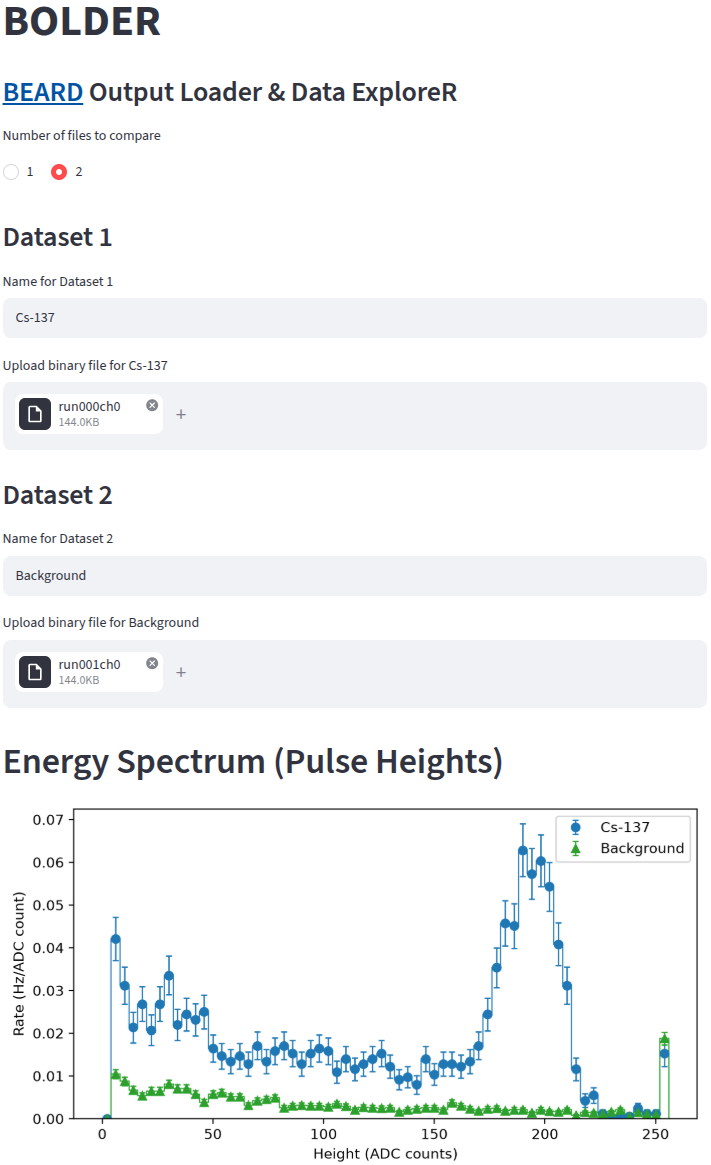
Up to two output files run???ch? in the micro SD card can be uploaded to BOLDER - BEARD Output Loader & Data ExploreR for users to explore their energy spectra, trigger rates, and waveforms in a web browser without any programming. One dataset could be the background spectrum and another one could be an energy spectrum from a radioactive source.
Local Rendering
For users who want to explore the data mannually, a Python script b2r.py is provided as an example to show how one can convert the binary file (run???ch?) to ROOT format. It uses the uproot python package to create a ROOT TTree to hold waveform data in run???ch?.root. In a Mac or Linux terminal, one can run the following command to convert a binary file to ROOT format:
python -m venv .venv
source .venv/bin/activate
pip install uproot
cd /path/to/b2r.py
python b2r.py /path/to/run???ch?
deactivate
The generated ROOT file can be opened and inspected using the following command and code if you have ROOT installed.
root run004ch0.root
(TFile *) 0x1015917e0
root [1] .ls
TFile**         run004ch0.root
 TFile*         run004ch0.root
  KEY: TTree    t;1
root [2] t->Show(0)
======> EVENT:0
 n               = 64
 ms              = 90
 us              = 0,
                  2, 4, 6, 8, 10,
                  12, 14, 16, 18, 20,
                  22, 24, 26, 28, 30,
                  32, 34, 36, 38
 s               = 5,
                  4, 5, 4, 4, 4, 4, 4, 141, 88, 59,
                  45, 36, 31, 28, 26, 24, 24, 22, 21
 h               = 141
where, n shows the total number of waveform samples saved in each event, ms is the time stamp of each event in the unit of ms, us is the time of each waveform sample in the unit of us, s is an array of waveform samples in ADC counts, h is the height of the pulse in the waveform.
t->Draw("h") gives the energy spectrum.
t->Draw("s:us", "", "l", 10, 2) draws 10 consecutive waveforms starting from event 2.